Start with the aluminum form and cut path: supported sheet, rigid profile or tube wall, or solid bar. Select an existing reviewed saw-family answer, then verify the exact tool’s material approval and the blade label’s application and section range.
QUICK ANSWER
Match saw-blade choice to the aluminum form.
Choose a saw blade by first identifying supported sheet, a profile or tube wall, or solid bar; the cut path determines which existing reviewed saw answer to inspect. Measure the wall or section crossed by the teeth, then verify the exact tool manual and blade label.
Choose the cutting system from the shape of the aluminum and the cut you need. Straight sheet cuts, supported profiles, tube, and curved openings load a blade differently; every option still needs a blade explicitly rated for aluminum and the exact saw.
Circular saw
Straight cuts in supported sheet
A guided circular saw can break down a stable sheet when both the blade and saw permit nonferrous cutting.
Boundary: Do not use a general wood blade or assume the saw accepts metal simply because the arbor fits.Open the reviewed pairing Miter saw
Square cuts in rigid profile
A miter saw can make repeatable crosscuts when the work cannot rotate and the manufacturer approves nonferrous material.
Boundary: Thin angle and channel need support that prevents collapse, lifting, or a loose offcut.Open the reviewed pairing Jigsaw
Curves and short sheet cutouts
A jigsaw gives directional control for openings when the sheet is supported close to the line.
Boundary: Confirm the blade’s aluminum application and thickness range; a matching shank alone is not enough.Open the reviewed pairing Hacksaw
Small tube and occasional cuts
A hacksaw keeps the setup simple for small sections when its pitch matches the wall thickness.
Boundary: Large solids and long straight cuts are slow and make alignment difficult.Open the reviewed pairing
PREPARE THE CUT
A sequence you can verify.
Use the tool manual and blade label at every fit check. The steps below do not override either one.
01
Identify the alloy form: sheet, solid bar, tube, angle, channel, or another profile. Measure the wall or section crossed by the teeth.
02
Choose a reviewed saw family for the cut shape, then confirm the tool manual permits aluminum and the blade label covers the saw, material, and thickness.
03
Clamp the work so neither the main piece nor offcut can rotate, pinch, or fall into the blade. Keep guards and the intended feed path clear.
04
Make a short controlled test. Stop at grabbing, welded chips, rising heat, vibration, or a shifting workpiece; revisit blade application, support, and feed.
05
Wait for the blade to stop, then handle hot chips and deburr the cut edge with a method suitable for the finished part.
TROUBLESHOOT THE RESULT
Read the symptom before changing the blade.
What you see
Likely setup issue
What to check next
Teeth load with aluminum
Rubbing, a dull or unsuitable tooth form, poor chip clearance, or pausing in the kerf
Stop and inspect the blade application, sharpness, chip path, and the tool maker’s permitted lubrication method.
Profile grabs or twists
The section is poorly supported, the offcut can rotate, or the blade geometry is too aggressive for the setup
Rework clamping and support; verify a nonferrous-rated blade and the saw maker’s material approval.
Thin wall chatters
Too few teeth are engaged or the wall can flex away from the blade
Measure wall thickness, use the maker’s pitch range, and support closer to the cut without entering the guard path.
The current product page separately lists pipes and profiles up to 25 mm diameter. Diameter is not wall thickness. Historical catalogs can differ; this entry follows the linked current product page.
Boundary: This is one jigsaw application example. It does not approve a circular, miter or band saw, prescribe speed or lubricant, or establish compatibility with your machine.
Clamp rigidly, use a nonferrous-rated blade, and follow the tool manufacturer’s lubrication guidance.
Thickness and form
A solid section, thin wall, sheet, tube, or profile can need a different pitch even when the material name stays the same. Use the blade finder with the actual wall or cut thickness.
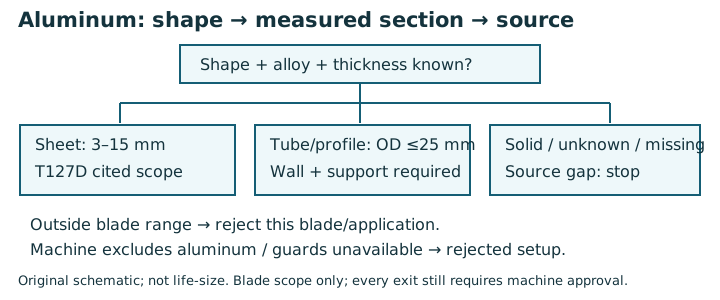
Aluminum decision tree: shape comes before diameter
Copy the alloy if known, shape and smallest wall thickness. The same outside dimension can describe a solid bar, a thin tube or a channel.
Original schematic; not life-size. Read the comparison table for the observable differences.
Observe / document
Interpretation
Next check
Sheet: fictional 4 mm aluminum
Bosch PRO Alu T127D Finnish product page states sheet 3–15 mm
Only this blade/application range is evidenced. Verify exact jigsaw, clamping and clearance separately.
Tube/profile: record outside dimension AND minimum wall
The same current Finnish T127D page states tubes/profiles up to 25 mm diameter
Do not carry a former 30 mm figure or sheet thickness rule into this different branch. Unknown minimum wall remains incomplete.
Solid bar / unknown shape / missing thickness
No complete solid-bar rating is established by the cited sheet/tube product page
Stop selection and obtain a manufacturer document for the exact form and machine.
Machine manual excludes nonferrous cutting, or required guards cannot be used
Rejected configuration even when a blade’s material label matches
Do not bypass guards or brakes. All unapproved branches remain incomplete.
Limit: No machine approval or unknown wall thickness means configuration incomplete, not permission to cut.
Sources and scope for this exercise
OSHA: point of operation — Guarding and workholding context; machine instructions still control the setup.
SawMatch source registry — Find the manufacturer document for the exact machine and blade, not only the material family.
Bosch PRO Alu T127D, Finland product page — Exact current regional product page: aluminum sheet 3–15 mm and tubes/profiles up to 25 mm diameter. No solid-bar or machine approval is inferred.